After my friend Brian's post about trimming expenses, I've been thinking about my own complete lack of doing so. It's a bit of a problem, potentially.
I've been eating out a lot more than usual, lately. I've been driving more than usual, too, partially as a result of eating out more. I'll need to make repairs to my car pretty soon, and I'm not sure how much those will be yet. Speaking of repairs, I also repaired my file server, to an extent. I bought a couple 2TB hard drives for $99.99 each. I was able to save most of my files, and all of my important files, so that was good. Still, $200.
I'm also thinking of buying things that I really don't need at all. For example, I want to buy another digital camera. Why? Because I keep one in the car to take pictures of personalized license plates. Why does that mean I need two? Because I never have one with me when the cats are doing cute things, and taking videos of cute cats is the quickest way to youtube stardom! I fully recognize that this is not the best investment, but I'll probably end up doing it before too long.
Then there's utilities. The hot weather of late has skyrocketed my power bill along with everyone else's. I've also tried watering my lawn to get some grass seed to grow. That didn't really work, but I'm sure my next water bill will be higher than I've ever seen it. I also bought that new grass seed, some starter fertilizer, and a small spreader at The Home Depot using gift cards. And for the little remaining grass I have combined with the small amount of new grass that came up, I'll need a new lawnmower soon. I'd like a nice quiet electric one, which apparently means $300 or so. I'd also like to avoid the battery problems people have reported, which means $200 or so instead, but having to use an extension cord. So far, I'm leaning toward this cordless 36V mower. We'll see.
Finally, I've been donating (or pledging to donate) more to charity. If that isn't a stupid use of money, I don't know what is! Seriously, though, I'm going to try eating at home more often again. When I do, it tends to be really cheap. Hopefully the fall brings more reasonableness to my power bill, and whatever lawn mower I buy is reliable and durable. You all can hope that I don't buy that extra camera so that you're not flooded with videos of my cats. And you can also thank me for keeping the economy going these past few months!
Showing posts with label Newegg. Show all posts
Showing posts with label Newegg. Show all posts
Monday, September 27, 2010

Wednesday, October 28, 2009
New Parts for File Server
I fixed my file server a couple of weeks ago. I now have my 3.5TB of storage space available again! If you'll recall, I've fixed my file server a few times before...
I started trying to fix my file server a couple of months ago by reinstalling Ubuntu. Unfortunately, this would hang at about 5% on the formatting/partitioning step. I suspected a faulty system hard drive, but didn't get around to trying another one until early October. I tried an old (from back in high school, for at least part of the machine) 40GB drive. The installation went through, but the system wouldn't boot from that drive. Since the drive had been in my garage for a number of years, I didn't particularly trust it. So, I went to Micro Center and picked up a 500GB hard drive that was on sale. It, too, allowed the installation to complete but would not boot up. It should be noted that the system hard drive has to be an IDE hard drive because I use all the SATA ports for the RAID array.
I figured it was most likely a faulty motherboard at this point. I went to newegg.com and picked out a cheap motherboard and processor (I always prefer to buy them together to ensure I have the right socket and so I don't have to mess with reapplying thermal grease whenever possible). Along with my new camera, the parts arrived in just a few days. I really do love Newegg.
There's not much else to tell. The installation went well, the raid was recreated without much hassle. I did learn a new command: mdadm --scan --detail /dev/md0 >> /etc/mdadm/mdadm.conf. I don't remember having to run this command or having to mess with mdadm.conf at all, in fact, in the past. I'm not sure what has changed, but in order to get the raid device to persist after rebooting, I had to do this. I'm just happy it all works.
And it does all work! I no longer have that noisy north bridge fan (this motherboard doesn't have a north bridge fan to get noisy)! Everything seems much more stable and efficient. I'm really quite pleased with the new motherboard. I'm also happy with the new camera. I took some pictures of the file server, which I can't believe I haven't done before!
I started trying to fix my file server a couple of months ago by reinstalling Ubuntu. Unfortunately, this would hang at about 5% on the formatting/partitioning step. I suspected a faulty system hard drive, but didn't get around to trying another one until early October. I tried an old (from back in high school, for at least part of the machine) 40GB drive. The installation went through, but the system wouldn't boot from that drive. Since the drive had been in my garage for a number of years, I didn't particularly trust it. So, I went to Micro Center and picked up a 500GB hard drive that was on sale. It, too, allowed the installation to complete but would not boot up. It should be noted that the system hard drive has to be an IDE hard drive because I use all the SATA ports for the RAID array.
I figured it was most likely a faulty motherboard at this point. I went to newegg.com and picked out a cheap motherboard and processor (I always prefer to buy them together to ensure I have the right socket and so I don't have to mess with reapplying thermal grease whenever possible). Along with my new camera, the parts arrived in just a few days. I really do love Newegg.
There's not much else to tell. The installation went well, the raid was recreated without much hassle. I did learn a new command: mdadm --scan --detail /dev/md0 >> /etc/mdadm/mdadm.conf. I don't remember having to run this command or having to mess with mdadm.conf at all, in fact, in the past. I'm not sure what has changed, but in order to get the raid device to persist after rebooting, I had to do this. I'm just happy it all works.
And it does all work! I no longer have that noisy north bridge fan (this motherboard doesn't have a north bridge fan to get noisy)! Everything seems much more stable and efficient. I'm really quite pleased with the new motherboard. I'm also happy with the new camera. I took some pictures of the file server, which I can't believe I haven't done before!

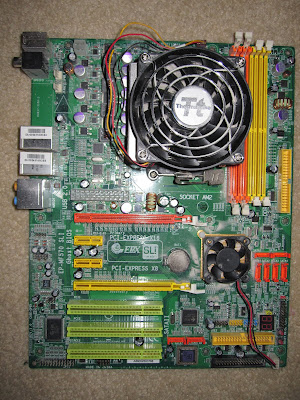
The old, very dusty, motherboard.

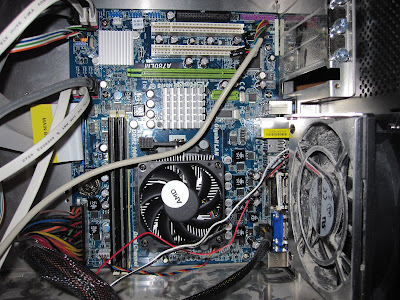
My newly installed motherboard. So pretty.

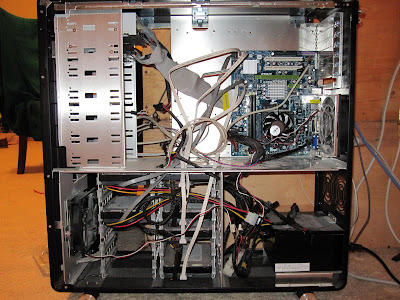
The entire case. This is my first Micro ATX motherboard, and it is surprisingly tiny.
Thursday, October 8, 2009
New Camera
My old camera is a PowerShot A610 5.0 MP camera. It still works, but it requires a lot of batteries. I bought some rechargeable batteries, but they only keep the thing running for about 15 pictures. They also lose their charge after sitting in the camera for a day or two, and they don't stay charged if I leave them in the charger, either. Basically, the (name brand) rechargeable batteries I bought are crap.
I've decided that my next camera will have a Li-ion battery pack to avoid these problems. If my new cell phone is any indication, it should last quite a long time with each charge. It looks like this will also allow for a smaller camera, since they can make Li-ion batteries in whatever size they need for the camera.
That decided, the question is now what type of camera to get. So far, I'm a fan of the Canon PowerShot SD780 IS and the Canon EOS Rebel XSi. I like the idea of getting a camera that will be able to handle any future photography plans I may have (ie, the Rebel), but I think I have to admit that 99% of its features would go completely unused by me. I don't know what most of them are, let alone how to use them effectively. The only thing I know I'd like currently is the rapid frame rate. On the other hand, I'll never learn about photography if I only ever have a point and shoot camera.
And then there's the size. You basically have to plan on taking pictures with a DSLR camera. It's not practical to take on a walk on the off chance you get inspired by a flower or eccentric person. The SD780 is only a little bit bigger than my cell phone, and less than an ounce heavier.
It comes down to practical versus ideal. The point and shoot will suit my current needs wonderfully, I'm sure. I've always liked the idea of being artistic, though. Photography is one of the few art forms where you don't have to be able to create beautiful things. You can be a successful photographer by knowing how to capture the beauty in things. (I realize many photographers do create beautiful things and photograph them, or alter photographs to make them better, etc. In no way do I mean to trivialize photographic artists or their art.) Can I capture the beauty in things, or do I just think I could? Would I devote the time required to learn about photography, thereby making a DSLR actually perform better for me than a point and shoot camera?
Friday, December 5, 2008
Chase Freedom Rewards
My Chase Freedom credit card gives me an extra $50 bonus if I save up my rewards until I get $200. I'm quite close, and after this month, I may just hit the $200 mark. I've been putting tons of stuff on my credit card, including buying gifts online on behalf of my parents as a method of paying them back the money I borrowed earlier. I also purchased a new TV for the living room; a Sharp Aquos 42" LCD 1080p.
All told, I've got $1300 in purchases racked up over just two orders. Since I get at least 1% back on that (plus 2% of the ~$500 I spent at newegg.com), I'm estimating a healthy reward for doing my part in helping the economy recover. Oh, and I'm thinking of spending another $350 or so to get a second 24" monitor so I can be more productive during my online TV watching. In fact, I may just do that tomorrow...
All told, I've got $1300 in purchases racked up over just two orders. Since I get at least 1% back on that (plus 2% of the ~$500 I spent at newegg.com), I'm estimating a healthy reward for doing my part in helping the economy recover. Oh, and I'm thinking of spending another $350 or so to get a second 24" monitor so I can be more productive during my online TV watching. In fact, I may just do that tomorrow...
Sunday, July 13, 2008
New computer specs
I've begun purchasing components for my new computer! I'm getting very excited. It will end up very similar to this one: Ultima. I've purchased the ram and power supply in order to take advantage of mail-in rebates that expire on the 15th or so. I will purchase the rest in my next credit card billing cycle, most likely.
Update: The HD4870 has fallen in price to $284.99! $25 saved so far just by waiting!
| Qty. | Image | Product Description | Unit Price | Savings | Total Price |
|---|---|---|---|---|---|
| 1 |  | $189.99 | -$20.00 Instant, $50.00 mail-in | $119.99 | |
| 1 |  | $284.99 | $284.99 | ||
| 2 |  | $99.99 | -$8.00 Instant. $35.00 mail-in | $113.98 | |
| 1 |  | $329.99 | $329.99 | ||
| 1 |  | $21.99 | $21.99 | ||
| 1 |  | $119.99 | -$30.00 Instant | $89.99 | |
| 1 |  | $94.99 | -$5.00 Instant | $89.99 | |
| 1 |  | $234.99 | -$20.00 Instant | $214.99 | |
| Subtotal: | $1,265.91 | ||||
Update: The HD4870 has fallen in price to $284.99! $25 saved so far just by waiting!
Thursday, February 28, 2008
Computer Upgrades
I placed an order on Newegg yesterday for two more 750GB hard drives for my fileserver. I'm very excited because they arrive tomorrow! Newegg is fast! I'm thinking of making a trip up to Microcenter at some point in the next couple of days to get a new north bridge fan. I figure as long as my machine is going to be off while I add new hard drives and the like, I might as well get rid of the one loud fan that's in the box. I still need to figure out exactly how to expand a linux raid5 array, but that should be fun. Also cool: my hard drives were each part of a combo deal, so I get two free USB drives - one is 2GB and the other is 4GB. Perhaps I'll actually use one sometime.
I also did some research for my next primary machine while I was shopping. I've picked out a likely case and memory, but beyond that I ran into some troubles. There wasn't any clear best choice on processor/motherboard/graphics combinations. In the end, I decided that since I won't be buying a new machine until at least June, that I'll postpone any research until then, too.
The only lasting decision I made was to name my new computer Nora. In fact, this will be the first computer I will have named. I chose the name when it immediately popped into my head when Newegg asked me what I should name the wish list of parts I'd created. So, I'm not sure what the significance is yet, but Nora has some potential to be special.
Subscribe to:
Posts (Atom)